Một giao diện — quản hồ sơ & giải captcha
Mở, dừng, gán proxy hàng loạt ở nửa trên; captcha tự giải ngay tại máy ở nửa dưới.

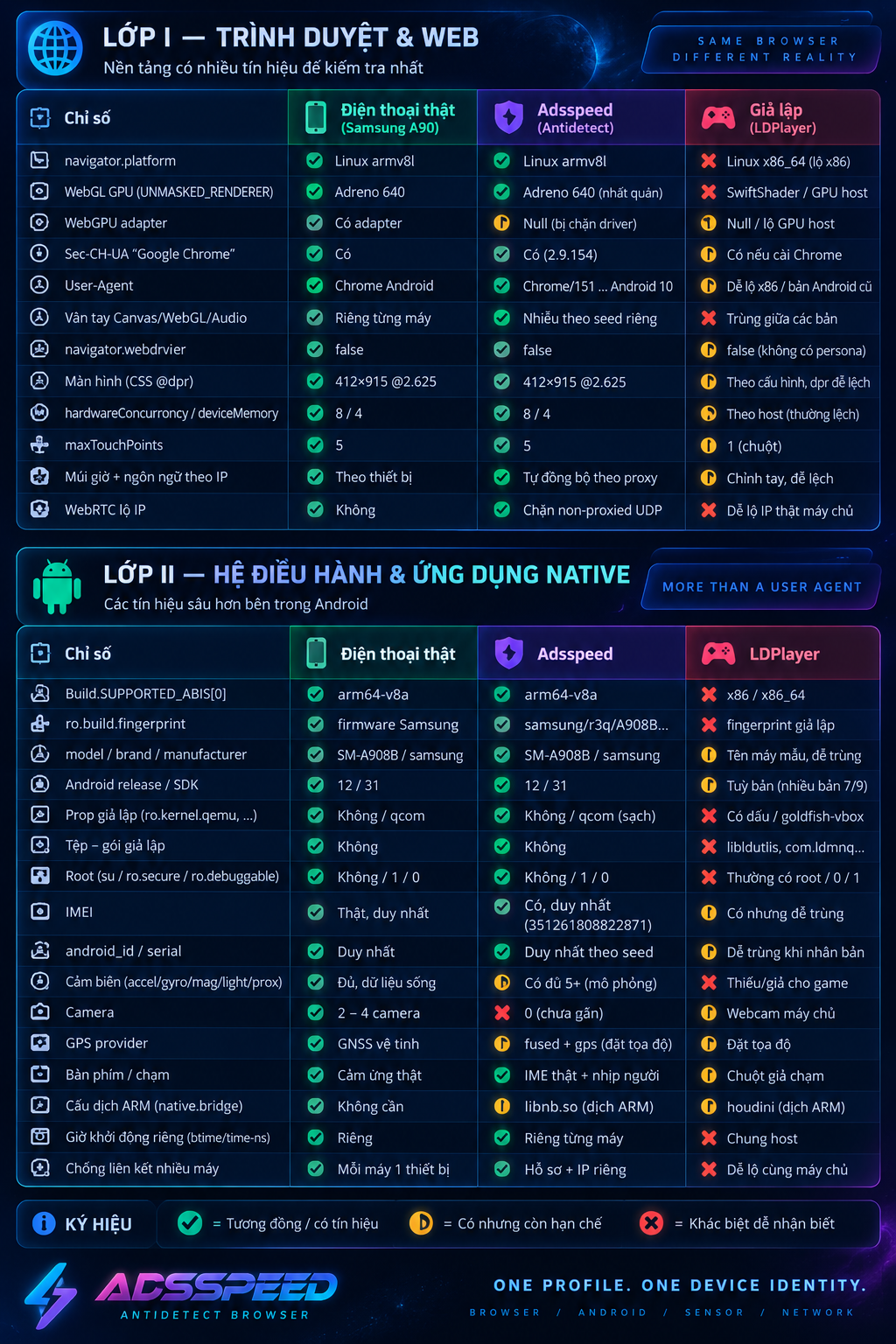
Không phải đổi vài dòng khai báo. Sáu tầng vân tay — từ API JavaScript xuống tới nhân trình duyệt và gói tin mạng — được dựng khớp nhau cho từng thiết bị, ngay trên máy bạn.
Bảo vệ trọn vẹn tài khoản của bạn.
Mở, dừng, gán proxy hàng loạt ở nửa trên; captcha tự giải ngay tại máy ở nửa dưới.
Không phải giả lập. Android dựng trên nhân thật — vân tay, cảm biến, IMEI và nhà mạng nằm ở tầng hệ điều hành, để mọi nền tảng đọc ra một chiếc điện thoại thật.
Nơ-ron AI tự nhận và giải chữ méo, lưới ảnh reCAPTCHA và thanh trượt ngay trên trình duyệt — giúp bạn vận hành hàng loạt tài khoản mà không kẹt ở bước xác minh.
Bật ghi, rồi dùng trình duyệt như bình thường: mở trang, gõ, bấm, cuộn. Công cụ biến từng bước thành một kịch bản chạy lại được — không cần phần mềm ngoài, không cần biết lập trình.
Cắm USB 3G/4G (Dcom) vào máy là có ngay proxy di động thật. Không thuê proxy ngoài, không phụ thuộc băng thông của bên thứ ba — IP là của chính SIM bạn cắm.
ip:port · ip:port:user:pass · SOCKS5 · link — dán thẳng vào mọi công cụChrome, Edge, Brave, Opera, Yandex hay Cốc Cốc — mỗi tài khoản chạy một nhân riêng với dấu vân tay khớp đúng, tách biệt hoàn toàn, không dính chéo.
| Trình duyệt | Windows | macOS | Linux | Android | iOS |
|---|---|---|---|---|---|
| Chrome | |||||
| Safari | |||||
| Edge | |||||
| Brave | |||||
| Opera | |||||
| Opera GX | |||||
| Yandex | |||||
| Cốc Cốc | |||||
| Samsung | |||||
| Chromium |
Khoá chặt tài khoản, cookie và dữ liệu quý trong lớp vòm bảo vệ, chống mất mát và liên kết chéo khi bạn vận hành hàng loạt hồ sơ cùng lúc.
Quét hàng loạt tài khoản Facebook Ads ngay trong trình duyệt — trạng thái, ngưỡng, hạn mức, số dư, đã tiêu, loại tài khoản. Kèm quản lý BM, fanpage, chia sẻ pixel & quyền admin. Cắm thẳng vào hồ sơ antidetect, không phải mở thêm phần mềm nào.
Dùng thử ngay! ↓Mọi gói đều đủ tính năng; chỉ Doanh nghiệp & Tùy chỉnh có hỗ trợ 24/7. Giá lấy đúng theo máy chủ — thanh toán xong hệ thống tự cấp số hồ sơ & số ngày.
Cần nhiều hơn 3.000 hồ sơ trình duyệt hoặc 150 hồ sơ điện thoại, hay muốn phương án riêng cho đội nhóm? Liên hệ để nhận báo giá theo đúng nhu cầu.
Extension quen thuộc của bạn nay nằm sẵn trong trình duyệt. Theo dõi hiệu suất, tối ưu chi phí và vận hành nhiều tài khoản quảng cáo — tích hợp sẵn, không cài thêm.
Tải về miễn phí, có ngay hồ sơ đầu tiên. Dữ liệu của bạn ở tại máy bạn — không cookie gửi lên máy chủ, không phí ẩn.