

Features
Turn 3G/4G Dcom modems into your own mobile proxies
Plug a 3G/4G USB modem (Dcom) into your PC and you get a real mobile proxy. No rented proxies, no third-party bandwidth — the IP belongs to the SIM you plugged in.
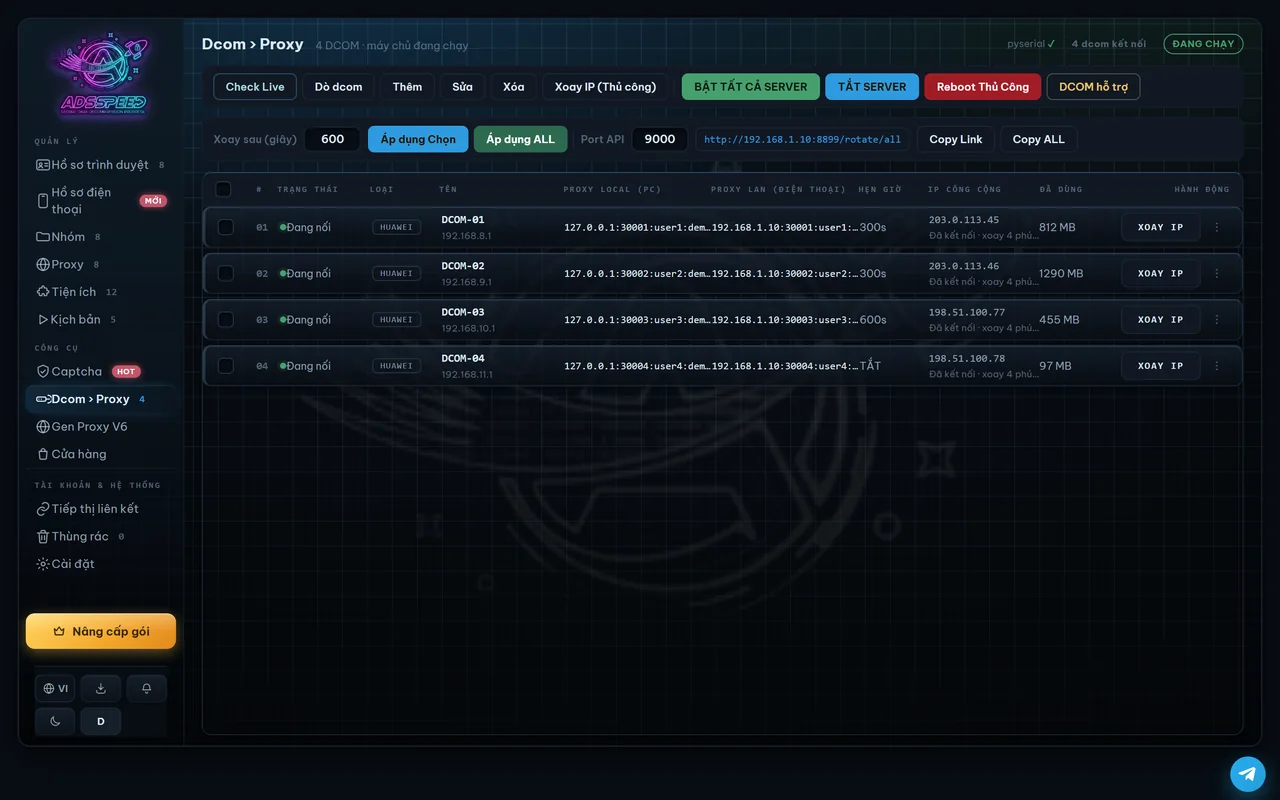
What you can do
Each Dcom becomes its own HTTP and SOCKS5 proxy with the SIM's mobile IP, not a datacenter IP.
Export ip:port, ip:port:user:pass, SOCKS5 or a link — paste it straight into any tool.
Run many Dcom modems on one PC, each on its own port.
Reset 3G/4G for a new IP right away, or schedule IP changes.
Use Dcom proxies for browser profiles and phones right inside ADSSPEED.
The IP belongs to the SIM you plugged in, with no third-party bandwidth.
Get started in 3 steps
- Plug in a Dcom
Plug a 3G/4G USB modem with a SIM into your PC.
- Get a proxy
Each Dcom becomes its own HTTP and SOCKS5 proxy in ADSSPEED.
- Use it and rotate
Assign it to profiles or export the format you need; change the IP when needed.
Frequently asked questions
What is a Dcom?
A Dcom is a 3G/4G USB modem with a SIM card. ADSSPEED turns each one into a proxy.
Can I change the IP?
Yes: on demand or on a schedule — resetting 3G/4G gives a new IP.
Which plans include it?
Dcom → Proxy is included in paid plans; see Pricing.
Related articles
Other features
Profile managementAndroid phonesAI captchaAutomationShared cameraAsset protectionAds extension
Get started with ADSSPEED
Download ADSSPEED for Windows, create a free account and try it today.